Eglantine Emulator
Eglantine is a new, free, and open-source Nintendo Switch 2 emulator. It is gaining a lot of attention because it can run games like Mario Kart World and Splatoon Raiders.
The emulator is built in C++ and is officially available for Windows, Linux, and macOS. Its documentation also explains how to set it up on Android, but it has no official information on iOS support yet.
The latest version, Eglantine nx2 Build 206, was released on November 4, 2026.
The Eglantine project, started by developer Camille LaVey, is developing quickly. It receives regular GitHub updates, with ongoing community contributions.
Recent improvements include AMD FSR 3.1 shaders, faster game-list scanning, updated documentation, and new build options. However, the emulator is still in the testing phase, so games may run slowly or experience errors.
Stable builds are suitable for regular users, while nightly and master builds give testers access to the latest fixes.
What I like most about Eglantine is that it is completely free and open-source. It also works easily across different platforms.
Its interface is user-friendly: new users can easily find the basic settings, while experienced users can adjust the advanced settings. The Official User Handbook is also very helpful for setting up the emulator and fixing problems.
Community support is available on Discord, but there is currently no guarantee of official 24/7 customer support.
Download Eglantine only from its official website, EglantineEmulator.com, or the official Djihads80/Eglantine GitHub repository.
Open the download page, select the latest build, and download the correct file for your operating system—Windows, Linux, or macOS. The direct GitHub link helps you avoid fake links, unnecessary redirects, and unwanted apps.
Keep reading to learn what Eglantine is, how powerful your PC needs to be, and how to safely install and set it up on your device.
Without any further ado, let’s get started:
What Is Eglantine Emulator

Eglantine is a free, open-source Nintendo Switch 2 emulator. It is currently in the experimental stage and allows users to run games on supported devices.
Built in C++, the project was started by Camille LaVey as a separate project from emulators such as Eden, Yuzu, and Sudachi. It is mainly designed for developers, testers, and gaming enthusiasts who want to try early Switch 2 emulation.
Eglantine currently provides official files for 64-bit Windows 10 and 11, Linux on x86_64 and ARM64 systems, and Apple Silicon Macs running macOS 15 or later.
Its documentation also mentions experimental support for Android ARM64 devices, but there is no official APK available for Build 204 yet. There is currently no official version for iOS or iPadOS.
To use Eglantine, you must have legally obtained firmware, decryption keys, and game files from your own Nintendo Switch console. Your computer must also have a graphics card that supports Vulkan 1.1 or OpenGL 4.6. Since the emulator is still experimental, performance may vary from game to game. Download it only from the official website, and avoid fake or modified versions.
Eglantine Emulator Features
Open-Source and Cross-Platform Support
Eglantine is an open-source Nintendo Switch 2 emulator built in C++. Its source code is available under the GPLv3 license, allowing developers to review the code and contribute improvements. Official builds are available for Windows, Linux, and Apple Silicon Macs.
Advanced Graphics Settings
The emulator offers several options for adjusting game performance and graphics quality. Users can choose anti-aliasing methods such as FXAA or SMAA and use image filters like Bilinear, Bicubic, Lanczos, AMD FSR, or SGSR. Anisotropic filtering can also be adjusted to make textures look clearer.
Controller and Game Management
Eglantine’s User Handbook provides complete instructions for configuring controllers, audio, graphics, save files, and storage. The emulator also supports game updates, DLC, mods, cheats, Amiibo, multiplayer setup, and importing older save data.
Performance-Focused Features
Profile-guided optimisation builds are available for supported platforms. Recent development updates have introduced game-specific performance options, shader improvements, graphics fixes, and GPU optimizations. These changes may improve frame pacing, loading times, and rendering in compatible games.
Experimental Development
Eglantine is still in an experimental stage. Its performance, compatibility, and available features may vary depending on the game, operating system, graphics drivers, selected settings, and the power of the computer’s hardware.
How to Download Eglantine Emulator?
If you want to download Eglantine Emulator safely, always use the download option available on its homepage. The button will take you to a dedicated download page, where you can easily access files hosted on the project’s official GitHub Releases page.
Follow these steps:
- Visit the EglantineEmulator.com.
- Click the Download button to open the download page.
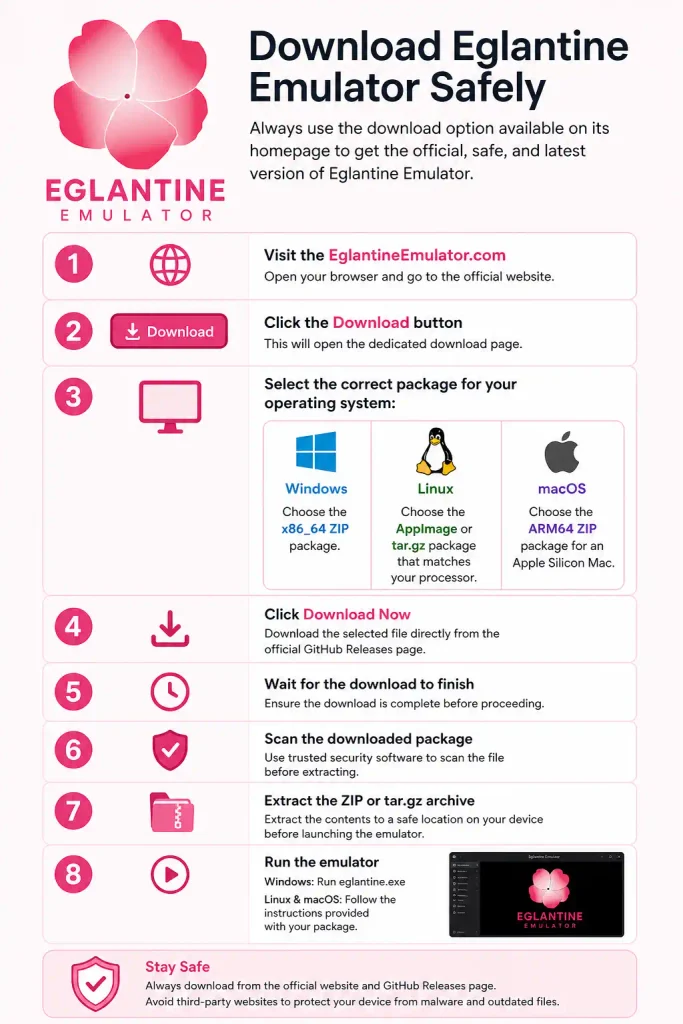
- Select the correct package for your operating system:
- Windows: Choose the x86_64 ZIP package.
- Linux: Choose the AppImage or tar.gz package that matches your processor.
- macOS: Choose the ARM64 ZIP package for an Apple Silicon Mac.
- Click Download Now to download the selected file directly from the official GitHub source.
- Wait for the download to finish.
- Scan the downloaded package using trusted security software.
- Extract the ZIP or tar.gz archive before launching the emulator.
- Windows users can run eglantine.exe. Linux and macOS users should follow the instructions provided with their package.
Frequently Asked Questions
Is Eglantine Emulator free?
Yes, Eglantine is a free and open-source emulator.
Which platforms does Eglantine support?
It is available for Windows, Linux, and Apple Silicon macOS.
Where can I safely download Eglantine?
Download it using the official GitHub Releases link provided on its download page.
Is Eglantine available for Android and iOS?
Currently, the verified releases do not include an official Android APK or iOS IPA.
Does Eglantine include games and firmware?
No. Users must obtain games, firmware, and decryption keys from hardware they legally own.